AI agents and automation
AI Agent vs Chatbot vs Automation: Which One Your Business Needs
An AI agent, a chatbot and workflow automation differ in who decides the next step: an agent lets a language model choose its own steps and tools toward a goal, a chatbot answers questions inside a conversation, and workflow automation runs fixed steps when a trigger fires. Most businesses need a layer of each, and the one to build first is the simplest one that solves the problem in front of you.
- For
- Founders
- Operations leads
- Anyone scoping their first AI build
 By Noor KhanFounder & CEO, Noorscale
- Published
- Published 8 November 2026
- Updated
- Updated 8 November 2026
- Reading time
- 21 min read
What is the difference between an AI agent, a chatbot and workflow automation?
The difference between an AI agent, a chatbot and workflow automation is the amount of decision-making each one is allowed: workflow automation makes none and follows a fixed path, a chatbot decides what to say but not what to do, and an AI agent decides which steps to take and which tools to call to reach a goal. An AI agent is a system in which a language model chooses its own actions and tools toward a goal it has been given. A chatbot is a program that holds a conversation and answers from a script or from a model grounded in approved content. Workflow automation is software that runs fixed steps across your tools when a trigger fires. If you've sat through three demos this month and each vendor called their product an agent, here is the honest part: "agent" has no single industry definition. This page uses the Anthropic and IBM definitions because they are published, dated and not tied to a product you'd be asked to buy. Each term gets defined in turn, agent first, because it's the one most people are asking about.
What is an AI agent?
An AI agent is a software system in which a large language model decides, step by step, which actions to take and which tools to use to reach a goal it has been given, such as qualifying a lead, resolving a support ticket or booking an appointment. Four published definitions agree on the shape. Anthropic: agents are "systems where LLMs dynamically direct their own processes and tool usage, maintaining control over how they accomplish tasks" (Building effective agents, 19 December 2024). IBM: "a system that autonomously performs tasks by designing workflows" and using the tools available to it (What are AI agents?, Anna Gutowska). Google's Agents whitepaper (Wiesinger, Marlow and Vuskovic, September 2024) describes an application that pursues a goal by observing the world and acting on it with the tools at its disposal. OpenAI's practical guide to building agents (2025) describes systems that accomplish tasks independently on a person's behalf. The common thread is four parts: a goal, a model that plans, tools it can call, and a loop that checks results and tries again. A chatbot shares the conversation but not the autonomy.
What is a chatbot?
A chatbot is a program that holds a conversation with a person through text or voice and answers from a script, a decision tree or, in an AI chatbot, from a language model grounded in a set of approved content. There are two kinds, and the gap between them is wide. A rule-based chatbot offers buttons, menus and fixed replies. An AI chatbot takes free-text questions and answers from your own content. Both live on the same channels: a website widget, WhatsApp, Instagram, Facebook Messenger, the phone. IBM's framing is useful here: a chatbot is a "modality", a way of talking to software, while agency is a framework for how the software decides (IBM, What are AI agents?). OpenAI's developer guidance says the same thing from the other side: a system that only answers questions, "a chatbot-like experience", is not an agent until it can act on other systems (OpenAI developer docs, Building agents). Automation, by contrast, has no conversation at all.
What is workflow automation?
Workflow automation is software that runs a fixed sequence of steps across your tools when a defined trigger fires, such as creating a CRM contact when a form is submitted, with no judgment at any step. The tool class is automation platforms such as Zapier, Make and n8n, and the three bill by different units: Zapier by tasks, Make by credits, n8n by workflow executions. The unit matters because it decides the cost later on this page. One thing worth saying plainly: most "AI automation" sold today is workflow automation with a model inside one step, summarizing a message or classifying a lead. That is still a fixed path. The model does one job inside it; it doesn't choose the path. How the three behave once they're running is the next question.
How does each one work?
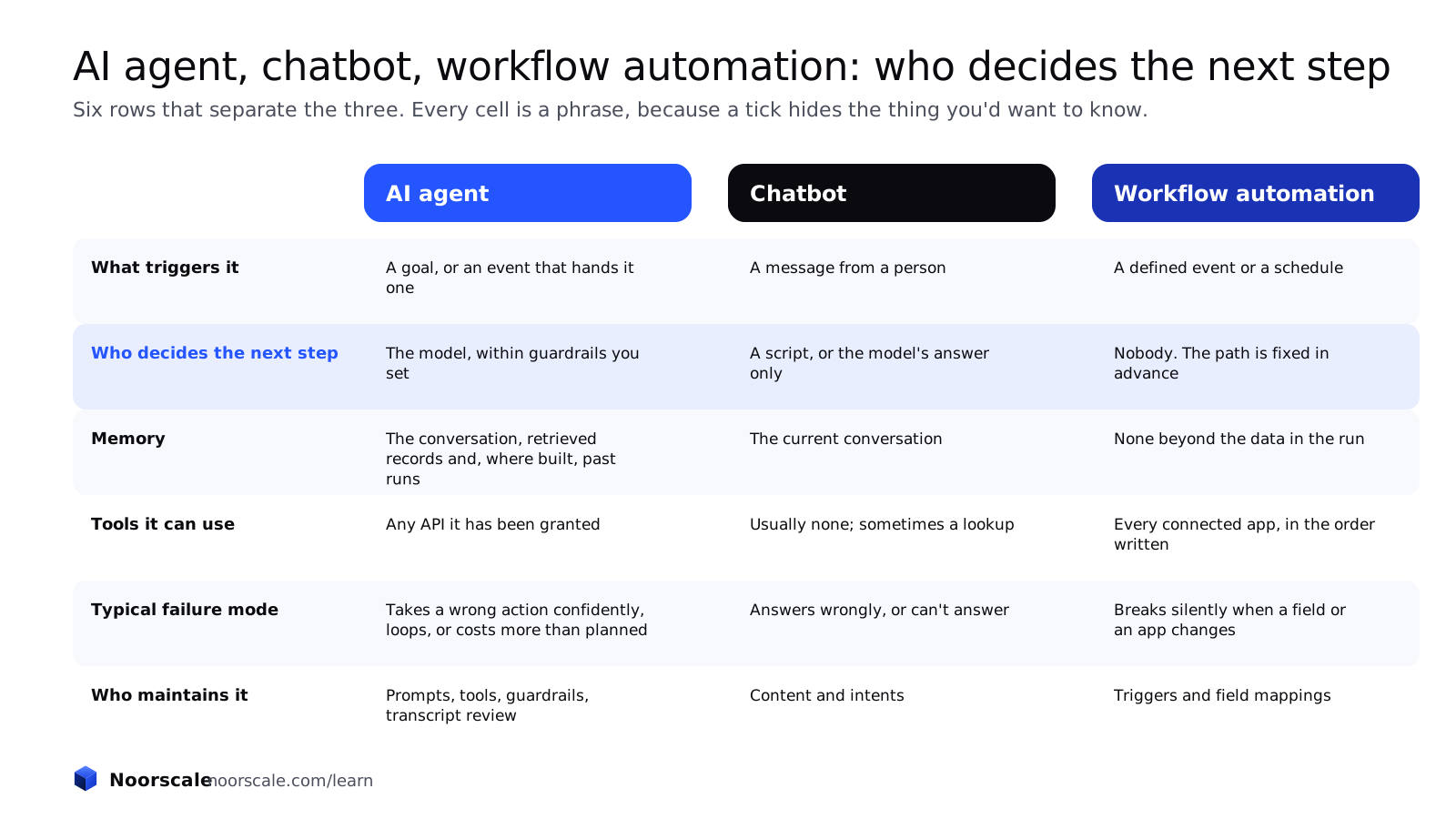
An AI agent works by looping through plan, act and check until the goal is met or a limit is hit; a chatbot works by matching a question to an answer inside one conversation; workflow automation works by executing the same steps every time its trigger fires. The six rows below are the ones that matter when you're choosing, and every cell is a complete phrase rather than a tick, because a tick hides the thing you'd want to know.
| AI agent | Chatbot | Workflow automation | |
|---|---|---|---|
| What triggers it | A goal, or an event that hands it one | A message from a person | A defined event or a schedule |
| Who decides the next step | The model, within guardrails you set | A script, or the model's answer only | Nobody; the path is fixed in advance |
| Memory | The conversation, plus retrieved records and, where built, past runs | The current conversation | None beyond the data in the run |
| Tools it can use | Any API it has been granted | Usually none; sometimes a lookup | Every connected app, but only in the order written |
| Typical failure mode | Takes a wrong action confidently, loops, or costs more than planned | Answers wrongly, or can't answer | Breaks silently when a field or an app changes |
| Who maintains it | Prompts, tools, guardrails and transcript review | Content and intents | Triggers and field mappings |
The chatbot column splits in two, which the next heading explains.
What is the difference between a rule-based chatbot and an AI chatbot?
The difference between a rule-based chatbot and an AI chatbot is where the answer comes from: a rule-based chatbot picks a pre-written reply from a decision tree, while an AI chatbot generates a reply from a language model that reads your approved content. A rule-based bot handles fixed menus, order status by number, and hours and location well, and it fails on any question outside the tree, which is most of them. IBM's support scenario draws the line: a rule-based bot "runs through static decision trees" and gives "predefined responses", while an agent chooses diagnostic steps based on the answers it gets (IBM, What are agentic workflows?). One thing to hold onto: an AI chatbot without tools is still a chatbot, not an agent. It can tell a visitor the price. It cannot book the call. The same line between fixed and chosen steps separates a workflow from an agent.
Where does a workflow end and an agent begin?
A workflow ends and an agent begins at the point where the model, not the code, chooses the next step. Anthropic says it exactly: workflows are "systems where LLMs and tools are orchestrated through predefined code paths"; agents are "systems where LLMs dynamically direct their own processes and tool usage" (Building effective agents, 19 December 2024). The same essay gives the advice most vendors leave out. It recommends "finding the simplest solution possible, and only increasing complexity when needed". It says "workflows offer predictability and consistency for well-defined tasks", while agents "can be used for open-ended problems where it's difficult or impossible to predict the required number of steps". And it names the price: "Agentic systems often trade latency and cost for better task performance."
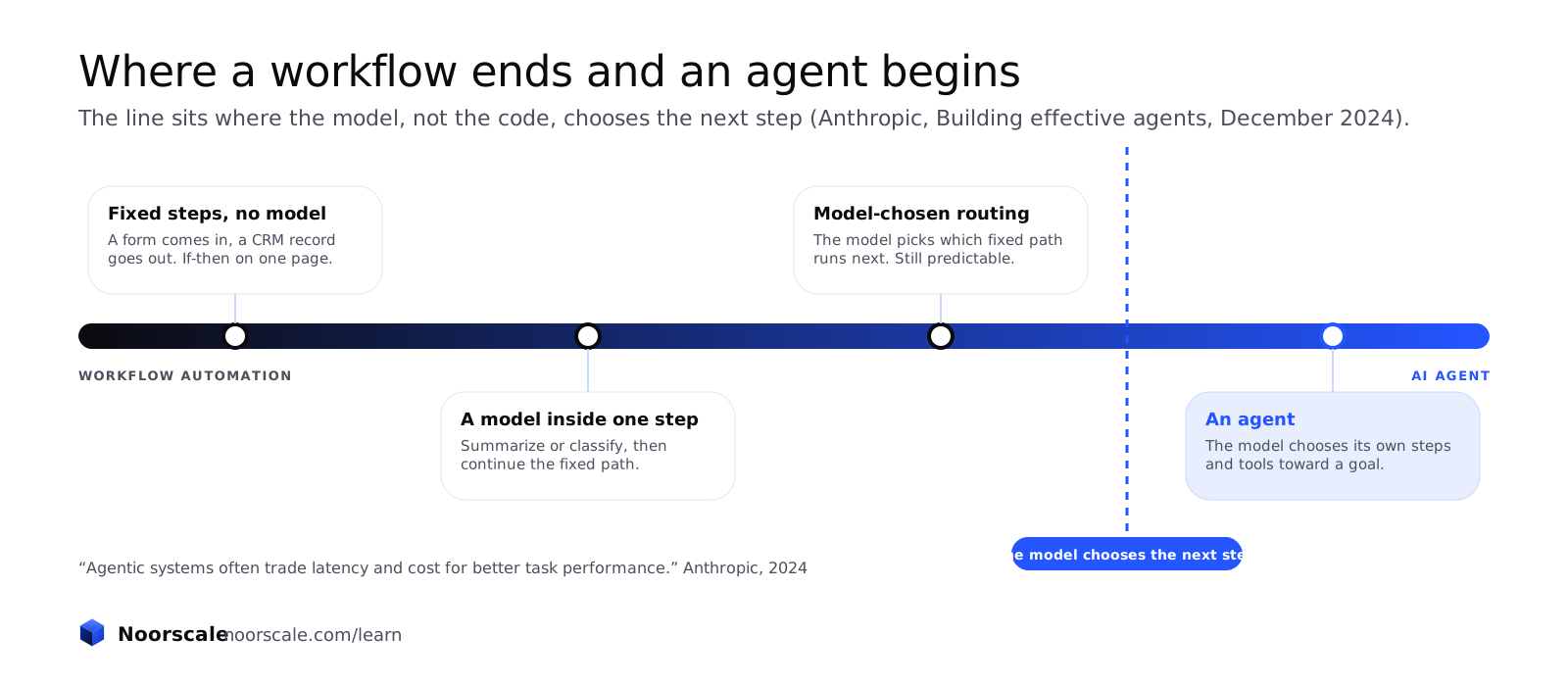
The workflow patterns Anthropic describes, prompt chaining, routing, parallel steps, an orchestrator with workers, and an evaluator with an optimizer, are what most businesses call "AI automation", and they are the right first build far more often than an agent is. What the agent's freedom buys in practice is next.
What can an AI agent do that a chatbot cannot?
An AI agent can do four things a chatbot cannot: take an action in another system, carry a task across several steps and tools, check its own result and retry, and continue work after the conversation ends. Each one is worth paying for in the right place, and each one is also a way to be wrong at scale.
The four capabilities, each with the kind of job it's for.
- Take an action in another system, such as creating a ticket in a help desk, issuing a refund within policy, or booking into the right calendar.
- Carry a task across several steps and tools, such as qualifying a lead against your criteria and then booking it with the right person.
- Check its own result and retry, such as noticing a lookup returned nothing and trying the customer's other email.
- Continue work after the conversation ends, such as chasing a missing document two days later and updating the record when it arrives.
Now the honest paragraph. An agent that can issue a refund can issue the wrong one. An agent that can retry can loop. An agent that works after the conversation can send an email nobody reviewed. This is why guardrails and approval steps exist, and the section on how the three work together puts the person back in the loop. First, the reverse question: what automation does better.
What does workflow automation do better than an AI agent?
Workflow automation does four things better than an AI agent: it runs the same way every time, it costs cents per run instead of a model call per step, it is easy to audit, and it fails loudly on a known field instead of quietly on a judgment. Zapier's Professional plan at $19.99 a month covers 750 tasks (list price, read 7 November 2026), which is what "cents per run" means in practice.
| The job | Why automation wins it |
|---|---|
| Form submitted, CRM contact created | The fields never change; a model adds variance and cost for nothing |
| Invoice issued, accounting updated | It has to be right every time and auditable afterwards |
| New order, fulfilment notified | Speed and sameness matter more than judgment |
| Job finished, review request sent | A fixed delay and a fixed message; nothing to decide |
| Monday, weekly report assembled | The same query, the same format, every week |
Here is the test. If a person can write the steps as if-then on one page, it is an automation, and giving it to an agent adds cost and variance for nothing; Anthropic's own line about trading latency and cost for performance applies. The case where neither is needed, because a chatbot is enough, is next.
When is a chatbot enough?
A chatbot is enough when the job is to answer questions from content you already have, when nothing has to happen in another system during the conversation, and when a person can take over any conversation that needs an action. Run the three tests on your own situation. Do visitors mostly ask about hours, pricing rules, service scope, sizing, order questions or pre-visit instructions? Does answering them require touching another system? Is there a person who can pick up when the bot can't? If the answers are yes, no and yes, an AI chatbot grounded in your own pages is the right first build, and for most small sites it is the cheapest of the three to run per conversation and the easiest to review. The grounding method is retrieval-augmented generation, where the model reads your approved pages before it answers rather than relying on what it remembers. It stops being enough at a precise moment: when the visitor says "book it" or "where is my order" and the bot has to hand off. Most real builds combine the three, which is next.
How do AI agents, chatbots and automation work together?
AI agents, chatbots and automation work together in a layered system: a chatbot handles the conversation, an agent handles the decisions that need judgment, workflow automation handles every fixed step around them, and a person approves the actions that carry risk. The layering is why "agent vs automation" is a false choice for most businesses. The real question is which layer the problem lives in.
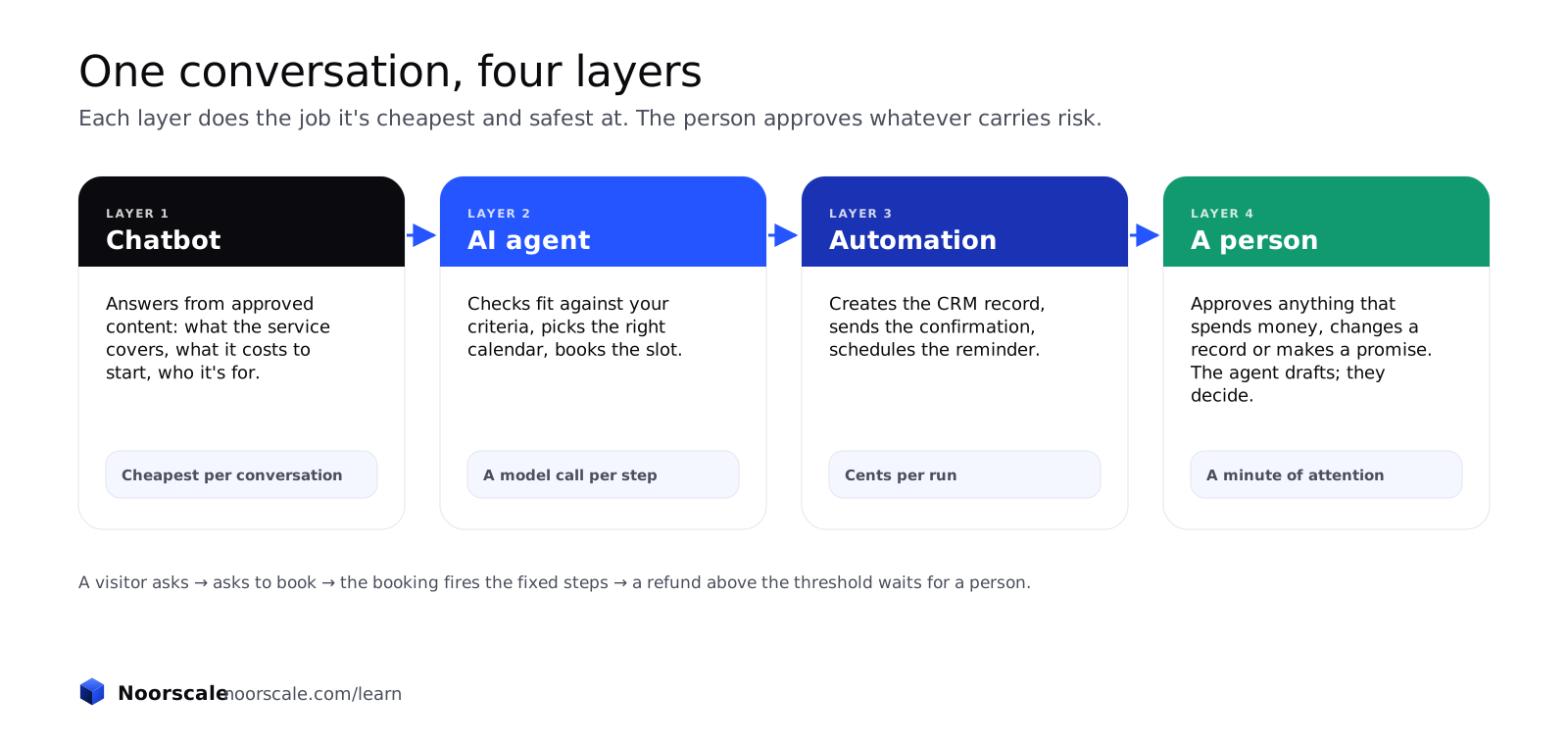
One booking, from first question to confirmed appointment, passes through every layer.
- A visitor asks a question. The chatbot answers from approved content: what the service covers, what it costs to start, who it's for.
- The visitor asks to book. The agent checks fit against your criteria, picks the right calendar, and books the slot.
- The booking fires an automation. The CRM record is created, the confirmation goes out, the reminder is scheduled.
- A refund request above a threshold comes in. It waits for a person, with the agent's draft attached.
Systems with several specialized agents handing work to each other exist, and they are a later step, not a first one. Where the human sits in all of this is the next heading.
Where does human approval belong in an agent workflow?
Human approval belongs at every step where the agent would spend money, change a customer record, promise something, or contact someone outside the conversation.
Four categories of action get an approval step by default.
- Spending money: refunds, credits, discounts, purchases.
- Changing a customer record: addresses, plans, permissions, anything that's hard to undo.
- Making a promise: a delivery date, a price, a guarantee of any kind.
- Contacting someone outside the conversation: an email to a customer who didn't ask, a message to a supplier.
The practical pattern is three words long: the agent drafts, a person approves, the automation executes. Approvals that are always granted get removed after a review period, so the list shrinks as trust grows. This is the human checkpoint Anthropic describes in its workflow patterns, and in Noorscale's view, stated as a view and not a statistic, it is the single biggest reason agent projects survive their first quarter. Examples by function are next.
What are examples of AI agents, chatbots and automation by business function?
Examples of AI agents, chatbots and automation by business function are: in sales, a chatbot that answers pricing questions, an agent that qualifies and books, and an automation that creates the CRM record; in support, a chatbot for order status, an agent for refunds within policy, and an automation for ticket routing; in operations, an agent that chases documents and an automation that files them; in scheduling, a voice agent that books and an automation that reminds. Which layer a business starts with depends less on its size than on where its people are losing time, and the last column says where each kind of business most often begins.
| Function | Chatbot | AI agent | Automation | Who usually starts here |
|---|---|---|---|---|
| Sales | Answers pricing, scope and fit questions from approved content | Qualifies the lead against your criteria and books it with the right person | Creates the CRM record and starts the follow-up sequence | SaaS and professional services start with the agent; e-commerce with the chatbot |
| Support | Order status, returns policy, how-to answers | Refunds and changes within policy, with the record looked up | Routes tickets by type and priority | E-commerce starts with the chatbot; SaaS with the automation |
| Operations | Internal questions about process and policy | Chases missing documents and updates the record when they arrive | Files documents and syncs data between tools | Professional services and healthcare start with the automation, within consent and record-access rules |
| Scheduling | Offers hours and pre-visit instructions | A voice agent that answers the phone, offers slots and books | Sends confirmations and reminders, and flags no-shows | Healthcare and local multi-location businesses start with the voice agent, within consent and record-access rules |
The scheduling row is where the phone comes in: a voice agent is an agent with a different channel, not a different category, and voice agents for appointment booking have their own considerations around consent and recording. How a business decides, which is the rest of this page, is next.
How do you decide which one your business needs?
You decide which one your business needs by asking three questions in order: can the steps be written as if-then on one page (automation), does the job end with an answer rather than an action (chatbot), and does someone have to judge across several systems to finish it (agent). Ask them in that order, because each one is cheaper than the next.
The decision tree has three questions, and most problems stop at the first or second.
- Can the steps be written as if-then on one page? If yes, it's an automation. Stop here; you're done, and it costs cents per run.
- Does the job end with an answer rather than an action? If yes, it's a chatbot, grounded in your own content.
- Does someone have to judge across several systems to finish it? If yes, and only if yes, it's an agent, with approval steps on anything that spends money or changes a record.
Two rules override the tree. Start one level simpler than you think you need; that is Anthropic's advice and it has held in every build Noorscale has scoped. And never give an agent a job you cannot yet describe as a checklist, because you won't be able to review its transcripts and tell whether it did the right thing. One more, because it comes up on almost every call: lead follow-up timing is almost always the automation branch, even when it's sold as an agent. Marketing automation is that branch, and it's usually the cheapest fix to the most expensive problem. The same tree, as a table by starting problem, is next.
Which option fits each starting problem?
The option that fits each starting problem is the one that matches the kind of decision the problem needs, and the table below sets it out by the problem a business usually arrives with. Find your row; the first build is in the next column.
| Starting problem | First build | What it must connect to | The sign it's working |
|---|---|---|---|
| Visitors leave with unanswered questions | Chatbot, grounded in your pages | Your content; a handoff to a person | Fewer repeat questions by email; conversations that end in a booking |
| Leads wait hours for follow-up | Automation | Forms, CRM, email or SMS | First response in minutes, every time, including nights and weekends |
| The phone goes unanswered | Voice agent | Calendar, CRM, call recording with consent | Calls answered and appointments booked outside office hours |
| Support repeats the same ten answers | Chatbot | Help content; the ticketing system for handoff | Ticket volume on those ten topics falls; satisfaction holds |
| Refunds and changes need policy judgment | Agent, with approval steps | Orders, payments, the policy as written | Resolutions within policy, with a person approving the exceptions |
| Data is re-typed between tools | Automation | Both tools' APIs | Zero manual re-entry; a log you can audit |
| Appointments no-show | Automation, then a voice agent | Calendar, SMS, the phone | No-show rate falls after reminders; rebookings happen without a call |
The unanswered-phone row is a voice agent, which is an agent with a different channel rather than a different category; AI voice agents is that build. What each one costs is next.
How much does an AI agent, a chatbot or automation cost to build and run?
An AI agent costs the most to build and run, a chatbot the least per conversation, and workflow automation the least per run, with the gap set by how many model calls each makes. The platform prices below are the vendors' own list prices, read on 7 November 2026, and they change; the point is the unit each one bills by, because the unit is what your volume multiplies.
| Layer | Vendor and unit | List price |
|---|---|---|
| Chatbot or support agent | Intercom Fin, per resolved outcome | From $0.99 per outcome, with a minimum monthly commitment; no seat required |
| Chatbot or support agent | Zendesk, per automated resolution | $2.00 pay-as-you-go, or $1.50 committed |
| Voice agent | Retell, per minute | $0.07 to $0.31 a minute; the vendor's own example comes to $0.11 |
| Voice agent | Vapi, per minute | $0.05 a minute hosting, plus the speech and model providers' pass-through rates |
| Voice agent | Bland, per minute | Start at $0.14 a minute with no platform fee; Build at $0.12 a minute plus $299 a month |
| Automation | Zapier, per task | Free for 100 tasks a month; Professional from $19.99 a month billed annually for 750 tasks; $129 a month for 10,000 |
| Automation | n8n, per workflow execution | Cloud Starter at 20 euros a month billed annually for 2,500 executions; Pro at 50 euros for 10,000; a self-hosted version is on GitHub |
| Automation | Make, per credit | Free plan with 1,000 credits a month |
Built and managed, the numbers depend on four things: volume, which multiplies every unit above; model choice, since a stronger model costs more per call; channels, since voice adds telephony and speech on top of the model; and how much review you want, since a transcript review each week is a person's time. An agent carries a setup cost and a monthly cost, because the prompts, tools and guardrails need tuning after launch; a grounded chatbot carries a smaller setup and a smaller monthly; automation is usually scoped per project. Noorscale prices all three from a written scope rather than a package, so the quote lists what it covers and you can hold it to that list. How long each one takes to build is next.
How long does each one take to build?
Workflow automation takes days, a chatbot grounded in your own content takes two to four weeks, and an AI agent with tools, guardrails and approval steps takes four to twelve weeks before it can be trusted without a person reading every transcript. These are Noorscale's own timelines from its builds, stated as such; no third-party figure was verified for this page, so none is quoted.
| Build | Typical time | What takes the time |
|---|---|---|
| Workflow automation | Days | Mapping the fields between tools, and testing the edge cases where a field is empty |
| Chatbot grounded in your content | Two to four weeks | Gathering and cleaning the approved content, testing against real past questions, and tuning the handoff |
| AI agent with tools and approvals | Four to twelve weeks | Defining the tools and their limits, writing the guardrails, and the weekly transcript review until the approval list can shrink |
The days-not-weeks claim for the first row is workflow automation's offer, and it holds because nothing in it has to be taught. The clock doesn't stop at launch for any of the three: a weekly transcript review in the first month, monthly after that. What goes wrong, with the figures, is next.
What goes wrong with AI agents, chatbots and automation?
What goes wrong with AI agents is that most projects never leave the pilot: Gartner predicts over 40% of agentic AI projects will be cancelled by the end of 2027, McKinsey finds only 23% of organizations scaling an agent in any function, and MIT NANDA reports that 95% of organizations saw no measurable return from generative AI pilots. Those are the three figures a vendor's deck leaves out, and they're below with their samples.
| Organisation | Title and date | Sample | Finding |
|---|---|---|---|
| Gartner | Gartner Predicts Over 40% of Agentic AI Projects Will Be Canceled by End of 2027 (25 June 2025) | Gartner's forecast | Over 40% cancelled by end of 2027, for escalating costs, unclear business value and inadequate risk controls; of thousands of agentic AI vendors, only about 130 are real, a practice Gartner calls "agent washing" |
| McKinsey | The state of AI in 2025: Agents, innovation, and transformation (November 2025) | 1,993 respondents; fieldwork 25 June to 29 July 2025 | 62% at least experimenting with agents; 23% scaling in at least one function; no more than 10% scaling in any given function |
| MIT NANDA | The GenAI Divide: State of AI in Business 2025 (July 2025, preliminary) | 52 executive interviews, 153 surveys, 300+ implementation reviews | 95% of organizations see no measurable return on generative AI pilots. The figure is about generative AI pilots broadly, not agents alone |
The failures sort by layer. Agents fail on cost, unclear value and missing risk controls, Gartner's three reasons in Gartner's words. Chatbots fail on content that nobody owns, so answers go stale and the bot gets switched off. Automations fail when a field or an app changes and nobody is watching, which is why the silent failure in the comparison table above is the one to design for. The MIT report's line is the one to pin above the desk: tools fail "because they don't learn, adapt, or integrate". And Gartner's "agent washing" is the reason this page opened with definitions. How Noorscale avoids the three failure modes is next.
How does Noorscale build AI agents?
Noorscale builds AI agents the simple way first: a knowledge base from your own approved content, a chatbot layer that answers and qualifies, agent actions only where judgment is needed, workflow automation for every fixed step, and an approval step on anything that spends money or changes a record. AI chat agents is where that build is scoped, and it runs in four steps over about four weeks: map the questions and the fit criteria, build the knowledge base and the flows, test against real past questions, then launch and tune with weekly transcript reviews in the first month. What gets reported is first response time, qualified leads from chat, calls booked in chat, and answer accuracy against the test set. The same build runs on the phone as a voice agent, and every fixed step goes to workflow automation, so a client never pays agent prices for an if-then. Noorscale's published results are search results, not agent results, so none is claimed here.
What should you do this week?
This week, take the one job you most want to hand to software and try to write it as if-then on a single page. If you can, you've just scoped an automation, and it will cost cents per run. If you get stuck at a step where a person has to look at two systems and decide, circle it. That circle is the only part that might need an agent, and everything around it doesn't.

Comments
Disagree with something, or have a case this page doesn't cover? Noor reads every comment and replies to the ones that add something, here on the page. Your email is never shown.